

For years, Plex has been the go-to way to watch your own films and TV series, stored on a computer or network drive at home. On 21 October, users learned that the team responsible for its video player had reportedly been laid off. Its former lead now recommends switching to Infuse or Jellyfin himself.
Should you take that advice? The two options require different levels of effort, and neither addresses something migration guides often overlook: your viewing history.
At Gemster, we do not make a media server or a video player. But we built a Plex importer for our recommendation app, and that work showed us how valuable a Plex history is, and how easily it can be lost.
What happened at Plex?
It started with a thread on the official Plex forums. Since version 2026.20.0 of the app, users have reported that some Dolby Vision files no longer play on Apple TV and iOS. On 21 October, a now-deleted message in that thread announced that the player development team had been laid off. There is no evidence that the bug and the departures are connected.
The player is the part of Plex you use every evening: the app that opens a file, decodes it and displays it on your television. Its former lead, Craig Holliday, confirmed on Reddit that he had written the message. According to him, no developers remain specifically assigned to video playback. He recommends that users turn to Infuse or Jellyfin.
According to Frandroid, more than twenty employees reportedly lost their jobs across the company. Plex has not confirmed that figure, and nothing officially suggests that it is abandoning playback of personal files. At the same time, Plex is increasingly promoting its other side, a service offering free, ad-supported films and channels , leaving server owners wondering where they fit in.
Eighteen months of tension
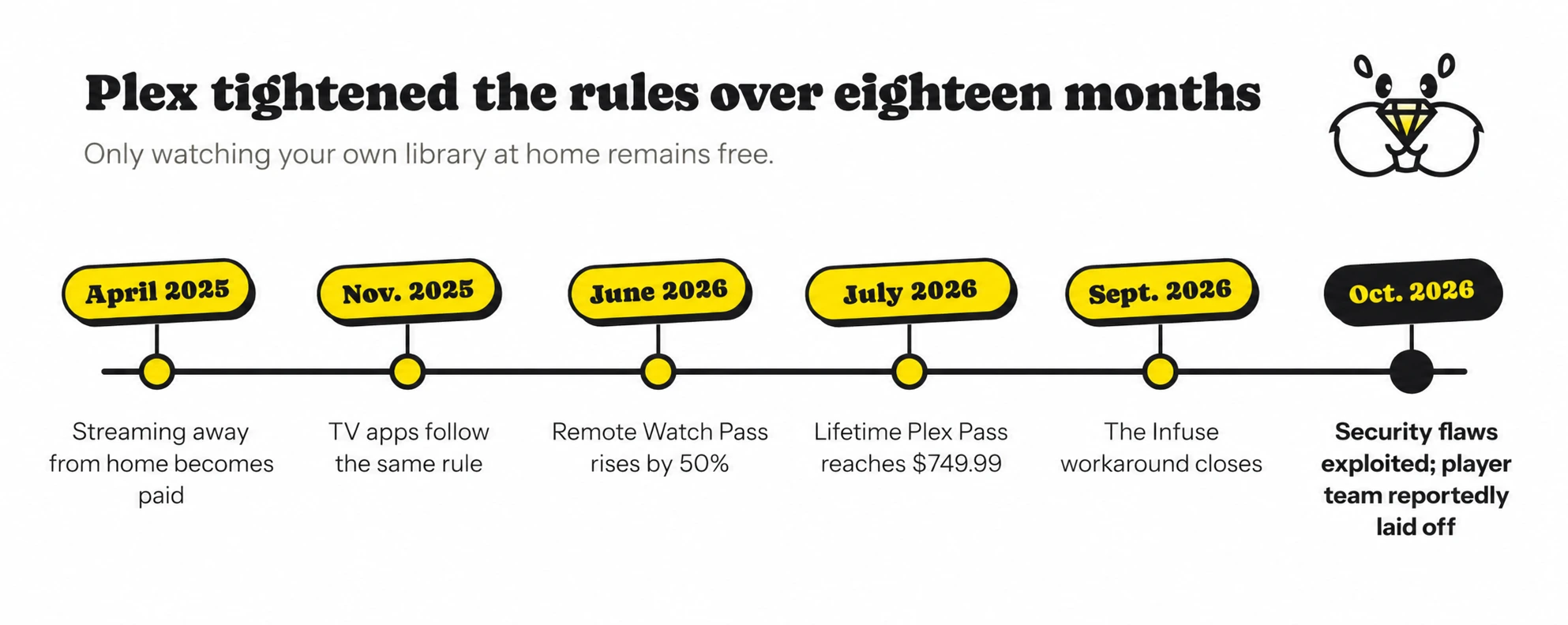
The news has struck a nerve because it follows a long series of changes. For years, Plex won people over with a simple promise: install a server at home to organise your films and series, then watch them anywhere, for free. That promise has gradually eroded.
- April 2025. Watching your own library away from home becomes a paid feature . You need a Plex Pass, or the new Remote Watch Pass at $1.99 a month. A lifetime Plex Pass rises from $119.99 to $249.99.
- November 2025. TV apps, from Apple TV to Roku, which had so far escaped the rule, become subject to it too .
- June 2026. Remote Watch Pass goes up by 50% .
- July 2026. A lifetime Plex Pass triples in price , reaching $749.99.
- September 2026. Firecore, the developer of Infuse, warns its users that the most common workaround is closing: remotely playing content from a Plex server through a third-party app now also requires a paid licence. Playback on your home network is unaffected.
- 20 October 2026. Plex confirms that security vulnerabilities are being actively exploited on servers that have not been updated.
- 21 October 2026. The player team has reportedly been laid off.
Taken on its own, each decision can be defended: running a service costs money, and a business has to survive. Taken together, they tell users something else: the video library they thought they owned actually depends on a service that can change its rules overnight.
Plex, Jellyfin, Infuse: who does what?
Think of a record collection. There is the shelf, which stores the records and keeps track of where each one is. Then there is the turntable, which plays them. A personal video library works the same way: a server organises your files and describes them with posters, summaries and seasons; a player displays them on your screen. Plex provides both. Its competitors divide up the roles.
“I keep my server and change my player”
This is the Infuse option. The player for iPhone, iPad, Apple TV and Mac connects to Plex, Emby or Jellyfin servers , and is known for handling almost any format. The app is free, with a paid Pro version.
Its strength: this is the gentlest transition; not a single byte of your library moves. Its drawback: Infuse is limited to Apple devices. And since September, remotely watching a Plex server through Infuse still means paying Plex.
“I change everything”
This is the Jellyfin option: a free, open-source server with no premium tier. Watching your library away from home is part of the software , and no central service can decide to charge you for it one day.
Its strength: freedom, without a bill. Its drawback: it takes a little more tinkering, especially for remote access, and its apps are often considered less polished than Plex's. The two options also work well together: Infuse can play content from a Jellyfin server.
“I stay, but prepare for what comes next”
Did you buy a lifetime Plex Pass a few years ago, and mostly watch at home? Nothing changes tomorrow morning. Some users take a middle path: install Jellyfin alongside Plex, pointing at the same files, as a backup if Plex changes its rules again.
The memory migration guides forget
Migration guides discuss files, metadata and remote access. They rarely cover a third layer, yet it is the most personal one: your viewing memory. In other words, the films and episodes you have watched, when you watched them, the ratings you gave them and the titles saved for later.
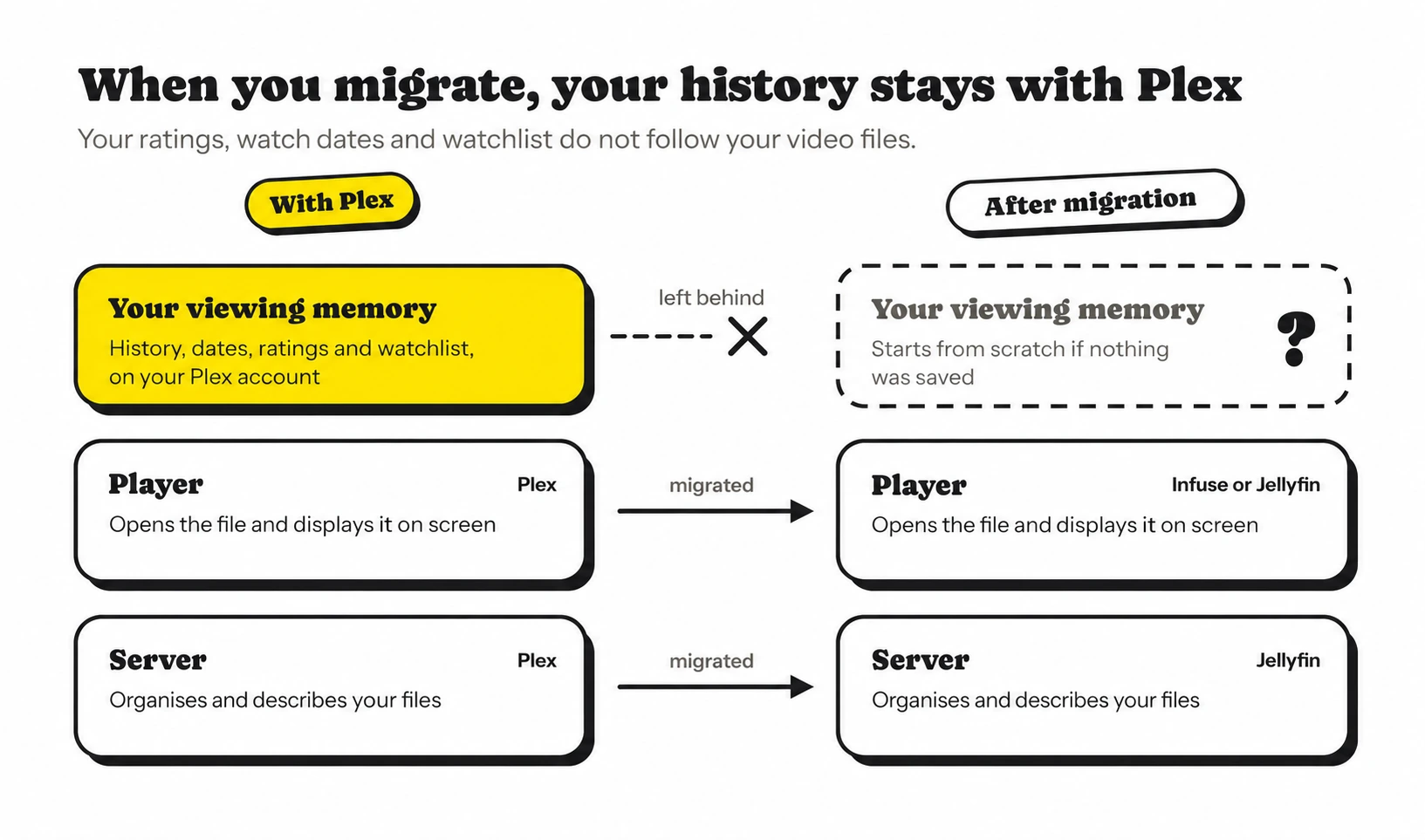
At Plex, this memory is scattered. A file's watched status is stored on the server, while viewing history is attached to your account. Plex explains in its support centre that the two do not always match. There is also the universal watchlist , launched in 2022, which mixes your files with Netflix and Disney+ catalogues, and your ratings, which Discover Together lets you share with friends .
Jellyfin, by contrast, is a server: it knows your files, but not the films you watched at the cinema or on another platform. On the Infuse forum, a user moving from Plex to Jellyfin looks for their watchlist and cannot find it.
Leaving without thinking about this is a bit like moving house with all your records but forgetting the notebook where you wrote down every concert. That notebook is valuable. It is what lets a recommendation system get to know you: an app starting from scratch suggests what everyone else watches; one that knows ten years of your evenings can surprise you.
Before you leave: five checks
You do not have to decide everything tonight. A few precautions are enough to make sure the move, if it happens, does not cost you your history:

- Update your Plex server, even if you plan to leave. Plex says that a server older than version 1.43.3.10861 and reachable from the internet may have been compromised .
- Back up your history and ratings before touching anything. A copy of your video files alone does not preserve all this information.
- Count your viewers. According to Plex, the server owner's Plex Pass enables remote streaming for invited accounts . Without it, each viewer needs their own Plex Pass or Remote Watch Pass; the latter also covers managed accounts in their Plex Home, but not other full accounts. With Jellyfin, everyone will need a new app and account.
- Test alongside Plex: install Jellyfin using the same files, then try your 4K films and every device in the household before switching Plex off.
- Do not close your Plex account too soon. Your viewing history is attached to it: keep the account until you have a copy elsewhere.
You can replace software over a weekend. Ten years of viewing memories are much harder to replace.
Gemster's approach
That notebook is what Gemster helps you keep. Gemster does not replace Plex, Jellyfin or Infuse: the app does not play your files or stream any video. It sits alongside them, keeping track of your viewing journey whichever tool you use to watch.
Plex import is free and offers two routes:
- Connect to Plex: sign in to Plex, with no tool to install or file to prepare. Gemster retrieves your profile history, even if you do not own a server, or the history from a server your account can access.
- Local export: for a server reachable only on your own network, a small tool provided by Gemster produces a file to import. Your Plex token stays on your computer.
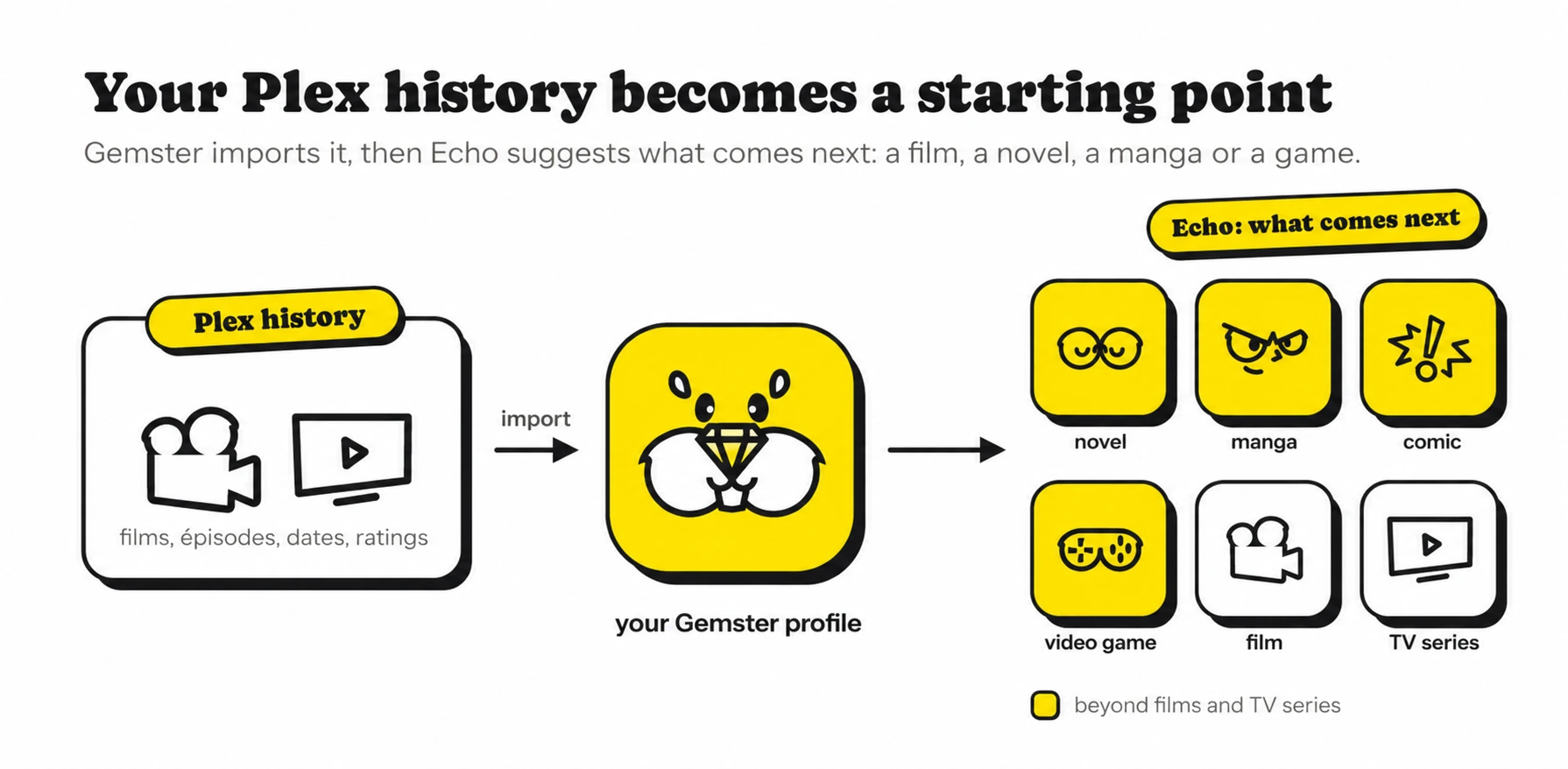
In both cases, Gemster matches identifiable films and episodes, with the available dates and ratings. There are limits: this is a one-off import, not a sync, and it does not automatically retrieve your entire watchlist. It changes nothing at Plex, and your video files stay at home.
You are not trading one dependency for another, either. CSV export of your library is complete and free, and your profile can remain entirely private. Other histories can follow the same route: Letterboxd, Netflix, Prime Video, TV Time and Steam, among others.
Once imported, your history becomes more than an inventory. Gemster makes recommendations based on your own tastes, never on other users' ratings, and goes beyond films and TV series. Start with a work to find what echoes it in Echo mode: after the science-fiction series you devoured on your server, Gemster might suggest a novel, manga or video game with a similar atmosphere. Or start with your overall tastes in Expedition mode, optionally specifying your current mood and the time you have available.
Import my Plex history · Try Gemster
Did a work on your server leave a lasting impression? Keep exploring with Gemster.
Plan your next steps with Gemster
Sources and references
- Clubic, Plex in disarray: developers laid off (23 October 2026)
- Frandroid, Switch to Infuse or Jellyfin: Plex lays off developers
- Mac4Ever, Plex raises prices and requires a remote playback subscription (2025)
- Journal du Geek, Plex charges for remote access (November 2025)
- Mac4Ever, Plex raises prices again (2026)
- Clubic, Plex to triple the cost of its lifetime subscription
- JellyWatch, Plex Now Charges for Remote Streaming in Infuse (October 2026)
- BetaNews, Plex confirms active exploitation of unpatched media servers (20 October 2026)
- Plex, Sync Watch State and Ratings (support centre)
- iMore, Plex rolls Netflix, Apple TV+ and more into a feature called Discover (2022)
- Cord Cutters News, Plex's New Discover Together
- Lilach Bullock, Jellyfin vs Plex
- App Store, Infuse
- Firecore forum, Jellyfin watchlist
- Photo: Claudio Schwarz / Unsplash
- Photo: Jason Leung / Unsplash
- Photo: Jakub Żerdzicki / Unsplash
- Plex, Remote Watch Pass Overview
- Plex, security update and exploitation of unpatched servers (October 2026)